2.2 Game Documentation
This section covers important information about each game on Vantage.
Vantage Originals
Minefield
Crash
Keno
A game from Chinese origins, where you select 10 numbers on a board of 40 numbers. When you bet, 10 random numbers are picked. You multiply your bet based on how many tiles you matched.
The game has the following information visible to the user:
- The keno board: A grid of numbers from 1 to 40. The user can click on tiles to select/deselect them. Revealed and matched numbers are shown here too.
- The possible multipliers: Boxes placed side by side below the keno board, indicating what multiplier you win for each possible hit amount.
- A Quick Pick button: Automatically picks 10 random tiles for you.
- Input field for Risk. The user can choose what risk mode they want to play with.
- Input field for Bet.
- A Reset button: Clears the Keno board. This deselects all your tiles and removes any revealed/matched tile coloring.
Below is the payout scheme for all possible combinations of risk mode and selected tiles:
| Risk Mode |
Tiles |
Hits 0 |
Hits 1 |
Hits 2 |
Hits 3 |
Hits 4 |
Hits 5 |
Hits 6 |
Hits 7 |
Hits 8 |
Hits 9 |
Hits 10 |
| Classic |
10 |
0 |
0 |
0 |
0 |
1.40 |
2.25 |
4.50 |
8.00 |
17.00 |
50.00 |
80.00 |
|
9 |
0 |
0 |
0 |
1.55 |
3.00 |
8.00 |
15.00 |
44.00 |
60.00 |
85.00 |
|
|
8 |
0 |
0 |
0 |
2.20 |
4.00 |
13.00 |
22.00 |
55.00 |
70.00 |
|
|
|
7 |
0 |
0 |
0.47 |
3.00 |
4.50 |
14.00 |
31.00 |
60.00 |
|
|
|
|
6 |
0 |
0 |
1.00 |
3.68 |
7.00 |
16.50 |
40.00 |
|
|
|
|
|
5 |
0 |
0.25 |
1.40 |
4.10 |
16.50 |
36.00 |
|
|
|
|
|
|
4 |
0 |
0.80 |
1.80 |
5.00 |
22.50 |
|
|
|
|
|
|
|
3 |
0 |
1.00 |
3.10 |
10.40 |
|
|
|
|
|
|
|
|
2 |
0 |
1.90 |
4.50 |
|
|
|
|
|
|
|
|
|
1 |
0 |
3.96 |
|
|
|
|
|
|
|
|
|
| Low |
10 |
0 |
0 |
1.10 |
1.20 |
1.30 |
1.80 |
3.50 |
13.00 |
50.00 |
250.00 |
1000.00 |
|
9 |
0 |
0 |
1.10 |
1.30 |
1.70 |
2.50 |
7.50 |
50.00 |
250.00 |
1000.00 |
|
|
8 |
0 |
0 |
1.10 |
1.50 |
2.00 |
5.50 |
39.00 |
100.00 |
800.00 |
|
|
|
7 |
0 |
0 |
1.10 |
1.60 |
3.50 |
15.00 |
225.00 |
700.00 |
|
|
|
|
6 |
0 |
0 |
1.10 |
2.00 |
6.20 |
100.00 |
700.00 |
|
|
|
|
|
5 |
0 |
0 |
1.50 |
4.20 |
13.00 |
300.00 |
|
|
|
|
|
|
4 |
0 |
0 |
2.20 |
7.90 |
90.00 |
|
|
|
|
|
|
|
3 |
0 |
1.10 |
1.38 |
26.00 |
|
|
|
|
|
|
|
|
2 |
0 |
2.00 |
3.80 |
|
|
|
|
|
|
|
|
|
1 |
0.70 |
1.85 |
|
|
|
|
|
|
|
|
|
| Medium |
10 |
0 |
0 |
0 |
1.60 |
2.00 |
4.00 |
7.00 |
26.00 |
100.00 |
500.00 |
1000.00 |
|
9 |
0 |
0 |
0 |
2.00 |
2.50 |
5.00 |
15.00 |
100.00 |
500.00 |
1000.00 |
|
|
8 |
0 |
0 |
0 |
2.00 |
4.00 |
11.00 |
67.00 |
400.00 |
900.00 |
|
|
|
7 |
0 |
0 |
0 |
2.00 |
7.00 |
30.00 |
400.00 |
800.00 |
|
|
|
|
6 |
0 |
0 |
0 |
3.00 |
9.00 |
180.00 |
710.00 |
|
|
|
|
|
5 |
0 |
0 |
1.40 |
4.00 |
14.00 |
390.00 |
|
|
|
|
|
|
4 |
0 |
0 |
1.70 |
10.00 |
100.00 |
|
|
|
|
|
|
|
3 |
0 |
0 |
2.80 |
50.00 |
|
|
|
|
|
|
|
|
2 |
0 |
0 |
17.10 |
|
|
|
|
|
|
|
|
|
1 |
0.40 |
2.75 |
|
|
|
|
|
|
|
|
|
| High |
10 |
0 |
0 |
0 |
0 |
3.50 |
8.00 |
13.00 |
63.00 |
500.00 |
800.00 |
1000.00 |
|
9 |
0 |
0 |
0 |
0 |
4.00 |
11.00 |
56.00 |
500.00 |
800.00 |
1000.00 |
|
|
8 |
0 |
0 |
0 |
0 |
5.00 |
20.00 |
270.00 |
600.00 |
900.00 |
|
|
|
7 |
0 |
0 |
0 |
0 |
7.00 |
90.00 |
400.00 |
800.00 |
|
|
|
|
6 |
0 |
0 |
0 |
0 |
11.00 |
350.00 |
710.00 |
|
|
|
|
|
5 |
0 |
0 |
0 |
4.50 |
48.00 |
450.00 |
|
|
|
|
|
|
4 |
0 |
0 |
0 |
10.00 |
259.00 |
|
|
|
|
|
|
|
3 |
0 |
0 |
0 |
81.50 |
|
|
|
|
|
|
|
|
2 |
0 |
0 |
17.10 |
|
|
|
|
|
|
|
|
|
1 |
0 |
3.96 |
|
|
|
|
|
|
|
|
|
The following gamedata is saved when you bet:
| Property |
Meaning |
Example |
| risk |
The risk mode selected by the user (classic/low/medium/high) |
low |
| selected |
Array with the user's selected tiles |
["1","28","10","23","8","9","5","38","20","24"] |
| kenoNumbers |
Array with random keno result |
["37","36","25","21","14","29","10","22","40","9"] |
Dice
A game where you predict whether the roll will be over or under a certain number.
The game has the following information visible to the user:
- The rangebar: Shows the rolled number, the rangebar with a green and red section and a dice icon upon rolling.
The rangebar also has a handlebar which the user can drag to change the rollover/rollunder number.
- Input field for Rollover/Rollunder. The user can enter their desired number here. Clicking on the label will change the mode (rollover/rollunder).
- Input field for Win Chance. Shows the percentage chance the user has to win. Updates when you update the rollover/rollunder number.
- Input field for Multiplier. Indicates the payout multiplier for when the user wins.
- Input field for Bet.
- Input field for Payout on Win. Indicates the total payout the user will receive if they win (bet * multiplier).
This game has no Instant Mode, since the dice roll is already pretty much instant.
The following gamedata is saved when you bet:
| Property |
Meaning |
Example |
| position |
Handlebar position, number to rollover/rollunder |
47 |
| mode (rollover/rollunder) |
Rollover or rollunder the position |
rollover |
| winchance |
The chance to win the bet |
53 |
| result |
The rolled result |
36.42 |
Gems
A game where 5 gems are revealed. A poker-style game where a better combo pays more.
The game has the following information visible to the user:
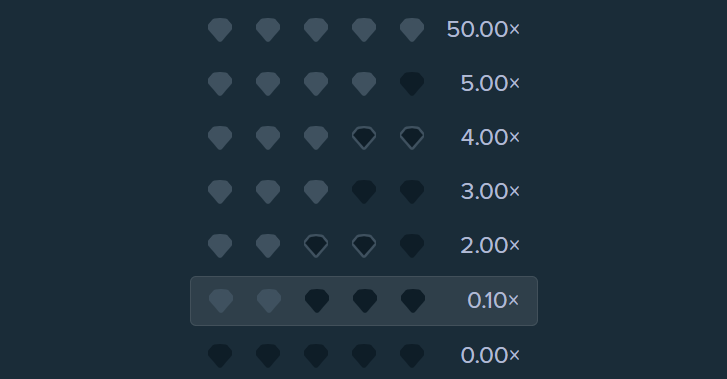
- The combo display: Shows the possible combinations and how much their multiplier is. The won combo is highlighted.
- The gem display: Shows the revealed gems.
- Input field for Bet.
The following gamedata is saved when you bet:
| Property |
Meaning |
Example |
| gems |
Array of revealed gems by their color |
["#f0d211","#42a4f5","#f0d211","#f0d211","#d211f0"] |
| combo |
Combo identifier, 1 is at the bottom of the combo display (1/2/3/4/5/6/7) |
4 |
Below is an overview of the gems available:
| # |
Gem |
Color code |
| 1 |
Red gem |
#cc1414 |
| 2 |
Light blue gem |
#42a4f5 |
| 3 |
Green gem |
#46c93c |
| 4 |
Yellow gem |
#f0d211 |
| 5 |
Purple gem |
#d211f0 |
Below is a screenshot of the combo display, where the user won combo 2:
Limbo
A simple game where the user bets on a specific multiplier. When the user bets, a random multiplier is generated (with higher multipliers being rarer). If the generated multiplier is the same or higher than the user's input, the user wins. The user only wins the multiplier they entered upon a win.
Below is a quick example:
| User Input |
Result |
Payout |
| 2x |
1.94x |
0x |
| 2x |
3.64x |
2x |
| 150x |
1.34x |
0x |
| 1.50x |
1.50x |
1.50x |
The game has the following information visible to the user:
- The result display: Shows the result multiplier and how much you won.
- Input field for Target Multiplier. The user can enter their desired target multiplier here.
- Input field for Payout on Win. Shows how much the user wins if their target is the same or lower than the result multiplier.
- Input field for Bet.
The following gamedata is saved when you bet:
| Property |
Meaning |
Example |
| target |
The target multiplier chosen by the user |
2 |
| result |
The result multiplier |
1.27 |
| random |
The randomly generated integer used to determine how high the result range should be |
0.4894700615939529 |
Wheel
A game where you spin a colored wheel, where the colors represent a multiplier.
The game has the following information visible to the user:
- The wheel: A colored wheel with a red pointer at the top.
- The color legend: Shown below the wheel. Tells the user which color represents which multiplier.
- Input field for Segments. Affects how many segments the wheel consists of.
- Input field for Risk Mode. Affects the overall difficulty to win on the wheel.
- Input field for Bet.
Both segments and risk mode affect the wheel and which colors/multipliers are available. Below is a table showing the variations:
| Risk Mode |
Segment |
#454545 |
#ececec |
#32CD32 |
#FFFF00 |
#A020F0 |
#FFA500 |
#1E90FF |
#fc1144 |
| Low |
10 |
0.00 |
1.20 |
1.50 |
- |
- |
- |
- |
- |
|
20 |
0.00 |
1.20 |
1.50 |
- |
- |
- |
- |
- |
|
30 |
0.00 |
1.20 |
1.50 |
- |
- |
- |
- |
- |
|
40 |
0.00 |
1.20 |
1.50 |
- |
- |
- |
- |
- |
|
50 |
0.00 |
1.20 |
1.50 |
- |
- |
- |
- |
- |
| Medium |
10 |
0.00 |
1.90 |
1.50 |
2.00 |
3.00 |
- |
- |
- |
|
20 |
0.00 |
1.70 |
1.50 |
2.00 |
3.00 |
- |
- |
- |
|
30 |
0.00 |
1.60 |
1.50 |
2.00 |
3.00 |
4.00 |
- |
- |
|
40 |
0.00 |
1.80 |
1.50 |
2.00 |
3.00 |
- |
- |
- |
|
50 |
0.00 |
1.80 |
1.50 |
2.00 |
3.00 |
- |
5.00 |
- |
| High |
10 |
0.00 |
- |
- |
- |
- |
- |
- |
9.90 |
|
20 |
0.00 |
- |
- |
- |
- |
- |
- |
19.80 |
|
30 |
0.00 |
- |
- |
- |
- |
- |
- |
29.70 |
|
40 |
0.00 |
- |
- |
- |
- |
- |
- |
39.60 |
|
50 |
0.00 |
- |
- |
- |
- |
- |
- |
49.50 |
| Roulette |
10 |
0.00 |
- |
35.00 |
- |
- |
- |
- |
2.00 |
|
20 |
0.00 |
- |
35.00 |
- |
- |
- |
- |
2.00 |
|
30 |
0.00 |
- |
35.00 |
- |
- |
- |
- |
2.00 |
|
40 |
0.00 |
- |
35.00 |
- |
- |
- |
- |
2.00 |
|
50 |
0.00 |
- |
35.00 |
- |
- |
- |
- |
2.00 |
The following gamedata is saved when you bet:
| Property |
Meaning |
Example |
| segments |
The number of segments selected by the user (10/20/30/40/50/38) |
20 |
| risk |
The risk mode selected by the user (low/medium/high/roulette) |
medium |
| resultSegment |
The segment number at which the wheel stopped. Goes from 1 to the number of segments selected |
15 |
| resultColor |
The color of the segment at which the wheel stopped |
#FFFF00 |
| resultMultiplier |
The multiplier of the segment at which the wheel stopped |
2.00 |
| stopAngle |
The angle which the wheel stopped. This angle is based on a single rotation (0-360) |
99 |
| fullAngle |
The angle which the wheel stopped. This angle is based on how far the wheel rotated away from the start (0) |
1539 |
Hilo
A card-based game where you have to guess whether the next card will be higher or lower (or the same) than the current card.
When you place a bet, your start card is revealed. Let's say this is a 6. On the left side, you will see the following options: "Higher or Same (62%)" and "Lower or Same (46%)". Let's now say that the card that is revealed when you make a choice is 9. If you chose "Higher or Same (62%)", your multiplier will increase and you can keep playing, making the same choice for this new card now.
The chance shown with your options is calculated based on how many cards are higher or lower than this card, including this card.
Your multiplier increases more if the chance of your choice is lower. For example, a 16% chance will pay more than a 62% chance.
If there is no card higher or lower than the current card, you will be prompted with "Higher"/"Lower" and "Same". Below is a quick example:
| Current Card |
Choice A |
Choice B |
| K |
Same (8%) |
Lower (92%) |
| 7 |
Higher or Same (54%) |
Lower or Same (54%) |
| A |
Higher (92%) |
Same (8%) |
In this game, K is the highest value (13), while A is the lowest value (1). Below is a table of the values per card, ranked from highest to lowest.
| Card |
Value |
Choice A |
Choice B |
| K |
13 |
Same (8%) |
Lower (92%) |
| Q |
12 |
Higher or Same (16%) |
Lower or Same (93%) |
| J |
11 |
Higher or Same (23%) |
Lower or Same (85%) |
| 10 |
10 |
Higher or Same (31%) |
Lower or Same (77%) |
| 9 |
9 |
Higher or Same (39%) |
Lower or Same (70%) |
| 8 |
8 |
Higher or Same (46%) |
Lower or Same (62%) |
| 7 |
7 |
Higher or Same (54%) |
Lower or Same (54%) |
| 6 |
6 |
Higher or Same (62%) |
Lower or Same (46%) |
| 5 |
5 |
Higher or Same (70%) |
Lower or Same (39%) |
| 4 |
4 |
Higher or Same (77%) |
Lower or Same (31%) |
| 3 |
3 |
Higher or Same (85%) |
Lower or Same (23%) |
| 2 |
2 |
Higher or Same (93%) |
Lower or Same (16%) |
| A |
1 |
Higher (92%) |
Same (8%) |
In addition to the two primary choices (A and B), you can also choose to skip a card. When you do this, the next card will be revealed without any risk. Your multiplier does not increase.
When a card is played (when the player has made their choice and the next card is revealed), it will be added back into the deck in a random position. This ensures the deck is always filled equally (52 cards).
The game has the following information visible to the user:
- The card display: Shows the current card the player has to make a choice about.
- The card history: Shown below the card display. A scrollable container showing the past cards and choices made by the user.
- Input field for Bet.
- Button for Choice A.
- Button for Choice B.
- Button for Skip Card.
- Input field for Payout. Shows the amount the player gets if they cash out now.
- Button for Cashout.
The following gamedata is saved when you bet:
| Property |
Meaning |
Example |
| history |
The card history
An array of objects with the following properties: 'value', 'suit', 'action', 'multiplier' |
[{"value":"6","suit":"c","action":"","multiplier":"1.00"},
{"value":"5","suit":"d","action":"skip","multiplier":"1.00"},
{"value":"Q","suit":"h","action":"higher","multiplier":"1.52"},
{"value":"K","suit":"h","action":"lower","multiplier":"0.00"}] |
Suit indicates the card's suit: h (hearts), c (clubs), s (spades) and d (diamonds).
Action indicates the action made by the user: empty (start card), higher (higher or same), lower (lower or same) and skip. The action is the choice made by the user BEFORE this card. For example, the history object shows an 8 as value and 'lower' as choice. That means that the user chose 'lower or same' on the previous entry in the history array. That is also why action is empty for the start card, since no choice could have been made prior to it.
An important note is that action does not include only-same choices. So choosing 'Same' on a K will show 'higher' as the action. Because there is nothing higher than a King, we can easily identify that the choice was 'Same'.
The gamedata for this game is only saved in the bet transaction when the game is over (cashout or loss). This is because the gamedata for this game logs the card history, which will expand as you play. If you were to close the tab mid-game, no gamedata is saved under the bet. You also will not automatically cashout.
This game has no Instant Mode, since the card reveal is already instant.
This game has no Auto Mode, since each card requires a player input.
To identify whether the player has cashed out or simply lost, we can look at the multiplier of the last entry in the card history. If this is 1.00 or higher, the player has cashed out. If it is 0.00, the player lost.
Dice Clash
In this game, you play against the computer to get the highest total score across your dice.
The game has the following information visible to the user:
- The roll display: Shows Your Roll on the left and Opponent's Roll on the right. Includes the dice and the totals.
- The won amount: Shown below the roll display.
- Input field for Bet.
- Input field for Risk Mode.
Besides getting a higher total than the computer, the payout depends on your total and risk mode. Below is an overview of the possible multipliers.
| Your total |
Low Risk |
Medium Risk |
High Risk |
| 1 |
- |
- |
- |
| 2 |
10x |
- |
- |
| 3 |
4x |
21x |
46x |
| 4 |
2x |
10x |
20x |
| 5 |
1.2x |
5x |
6x |
| 6 |
0.9x |
2.5x |
1x |
| 7 |
0.6x |
1.3x |
- |
| 8 |
0.6x |
1.2x |
- |
| 9 |
0.9x |
1.2x |
- |
| 10 |
1.2x |
1.2x |
- |
| 11 |
1.5x |
2x |
- |
| 12 |
3x |
4x |
- |
| Draw |
0.5x |
1x |
2x |
The amount of dice rolled also depends on your risk mode.
| Risk Mode |
Your Dice |
Opponent's Dice |
| Low |
2 |
1 |
| Medium |
2 |
2 |
| High |
1 |
2 |
The following gamedata is saved when you bet:
| Property |
Meaning |
Example |
| risk |
The risk mode selected by the user (low/medium/high) |
medium |
| playerTotal |
The total rolled by the player (all player rolls added up) |
8 |
| opponentTotal |
The total rolled by the opponent (all opponent rolls added up) |
6 |
| playerRolls |
An array of the player's rolled dices |
["5","3"] |
| opponentRolls |
An array of the opponent's rolled dices |
["4","2"] |
| multiplier |
The result multiplier for the player |
1.2 |
Stock Market
This game simulates fictional stock market activity over 10 iterations.
The game has the following information visible to the user:
- The stock display: A line graph showing the movement of the stock during a round.
- Input field for Current Value. Shows the current value of the fictional stock. Starts at 100.
- Input field for Final Payout. Shows the user the won amount after a game.
- Input field for Bet.
- Buttons for UP and DOWN. This is where the user selects whether they think the stock will go up or down.
When you press Bet, the graph will be filled. If the stock goes up, the line color will be green. If it goes down, the line color will be red.
You win money based on whether you Up/Down guess was correct, and by how much the stock went Up/Down. For example, if you bet 10, and the stock ends at 169.42, you win 16.94.
If you incorrectly guessed Up/Down, it doesn't mean you lose all of your bet. You still receive a fraction of your bet back. For example, if yu bet 10, and you guessed Up but the stock ends at 78.71 (down), you receive 7.87. The only scenario where you do not receive any portion of your money back is if the stock ends at an extreme (200 or 0). If you bet 10 and Down but the stock ends at 200 (up), you win nothing.
The following gamedata is saved when you bet:
| Property |
Meaning |
Example |
| percentage |
The percentage change from the starting point (100) |
-24.56 |
| prices |
An array of the price history |
["96.27","94.88","91.93","90.28","88.40","82.75","78.77","77.60","76.85","75.44"] |
| resultRandom |
The randomly generated integer used to determine where the stock should end (at which value) |
0.3973367365766389 |
| isBigChangeRandom |
The randomly generated integer used to determine whether the stock should increase/decrease drastically or just moderately |
0.17954481926807553 |
| priceData |
An object documentating the price data |
{"initialPrice":"100","currentPrice":"75.44","maxPrice":"200","minPrice":"0"} |
| betDirection |
The direction guessed by the player (up/down) |
up |
| resultDirection |
The result direction (up/down) |
down |
| percentageChangeOverall |
An always positive number showing the percentage change from the starting point (100) |
24.56 |
| payout |
The final payout for the user |
7.54 |
The gamedata used to contain a timestamps array aswell, but this has been removed because it was just always the same (an array with strings from 1 to 10). You can just calculate the amount of timestamps by looking at the length of the prices array.
Locked Tower
A simple game where your payout depends on how high you can get in the tower.
The tower consists of 6 squares. The unlocking is done automatically. The squares pay more the higher up you go, but unlocking them becomes less likely.
The game has the following information visible to the user:
- The tower with 6 squares numbered 1 to 6 with their awarding multipliers shown.
- Input field for Bet.
Below is a table showing the payouts and unlocking chances for each square:
| Square |
Chance |
Payout |
| 1 |
60% |
1.20x |
| 2 |
50% |
2x |
| 3 |
45% |
4x |
| 4 |
20% |
20x |
| 5 |
10% |
50x |
| 6 |
1% |
100x |
The following gamedata is saved when you bet:
| Property |
Meaning |
Example |
| squares |
An array containing JSON objects per unlocked square + the failed one
square: Which square (1 to 6)
status: Square status (unlocked or locked)
random: The random integer used in deciding whether to unlock the square. |
[{"square":"1","status":"unlocked","random":"2.22"},{"square":"2","status":"unlocked","random":"33.10"},{"square":"3","status":"locked","random":"73.00"}] |
Roulette
A simplistic roulette game.
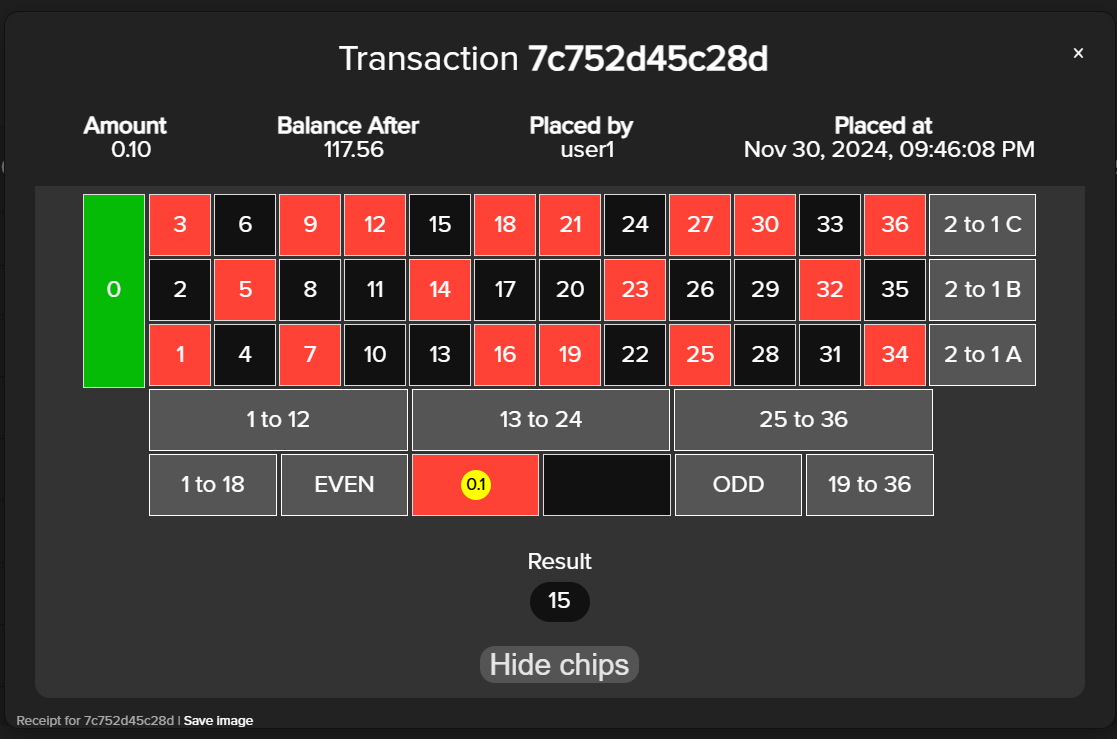
The game has the following information visible to the user:
- The roulette board where chips can be placed.
- The roulette wheel.
- The chips including a clear and spin button.
- Counters for balance and current bet.
- The result history.
The following gamedata is saved when you bet:
| Property |
Meaning |
Example |
| bet |
A JSON array containing all the bets made that round |
[{"amt":"5","type":"inside_whole","odds":"35","numbers":"23"},{"amt":"5","type":"inside_whole","odds":"35","numbers":"7"}] |
| numbersBet |
A string array of the numbers bet on |
["23","7"] |
| result |
The resulting roulette number the ball landed on |
25 |
Instant Roulette
This game is the same as Vantage Roulette, but the spin is instant. See Roulette documentation.
CTL
Roulette Royale
A roulette game brought to you by CTL. This game is visually better than Vantage Roulette and Vantage Instant Roulette.
The game has the following information visible to the user:
- The roulette board where chips can be placed.
- The roulette wheel, shown during the spin.
- The chips bar.
- Counters for balance and current bet.
- Information about the minimum and maximum bet amounts.
- Buttons to clear all chips, clear last placed chip and re-place last chip setup.
- Quick-place buttons for Voisins Du Zero, Tier, Orphelins, Neighbours and Finals.
- The spin button.
- The result history.
The following gamedata is saved when you bet:
| Property |
Meaning |
Example |
| numbers |
An array with arrays of potentially winning numbers
This contains nested arrays because its per position bet on
For example, betting on Even would have all even numbers in an array within this |
[["16"],["30"]] |
| positions |
A string array of the location of placed chips |
["bet_16","bet_30"] |
| result |
The number on which the roulette ball landed |
17 |
| betsetup |
A JSON array of the bet positions and bet amounts specified per position |
[{"bet_16":5},{"bet_30":5}] |
| history |
A string array containing the result history up to that point, not including the current result |
["23","6"] |
High or Low
A game where you guess whether the revealed card will be High or Low.
Cards from 2 to 7 are Low, cards from 8-King are High. Ace is both High and Low, so it will always result in a win.
The game has the following information visible to the user:
- The card to be revealed.
- Buttons for High and Low.
- The chips bar.
- Your current balance.
- Game statistics (how many Highs and Lows, and total guesses).
The following gamedata is saved when you bet:
| Property |
Meaning |
Example |
| bet |
The choice of the user (high/low) |
high |
| result |
The revealed card's value |
5 |
| card |
The specific card drawn.
All card images are available at https://cdn.kiy.li/img/vantage/ctl-cards/[card number].png
Card numbers run from 0 to 52, where 52 is the face-down sprite. |
30 |
Horse Racing
A horse racing simulator where you can bet on various options.
The game has the following information visible to the user:
- The betting board. Shows all 8 horses with options for WINS, PLACE and SHOW.
- A forecast betting board. Shows all combinations like 1x5 or 7x3. You guess which horses will finish 1st and 2nd.
- The chips bar.
- Your current balance and current bet.
- A clear bet button.
- Start race button.
Below is an overview of the odds as shown on the betting board:
| Horse |
WINS |
PLACE |
SHOW |
| 1 Engineer |
3.70x |
1.95x |
1.25x |
| 2 Pin |
5.55x |
2.55x |
1.70x |
| 3 Doughnut |
2.20x |
1.25x |
1.09x |
| 4 Mayhem |
11.75x |
5.50x |
2.55x |
| 5 Last Things |
17.25x |
7.75x |
4x |
| 6 Chatterbox |
8.75x |
3.05x |
1.75x |
| 7 Hypno |
7.15x |
2.50x |
1.55x |
| 8 Croquette |
6.15x |
2.05x |
1.35x |
Below is an overview of the odds as shown on the forecast board:
| Horse |
1 |
2 |
3 |
4 |
5 |
6 |
7 |
8 |
| 1 |
- |
20x |
6.25x |
60x |
80x |
23x |
20x |
15x |
| 2 |
28x |
- |
10.25x |
65x |
68x |
58x |
42x |
32x |
| 3 |
5.75x |
8.75x |
- |
26x |
31x |
19x |
15x |
10x |
| 4 |
84x |
56x |
23x |
80x |
- |
65x |
55x |
40x |
| 5 |
70x |
70x |
68x |
84x |
- |
80x |
70x |
50x |
| 6 |
48x |
58x |
13x |
70x |
80x |
- |
55x |
40x |
| 7 |
40x |
50x |
10x |
50x |
55x |
40x |
- |
35x |
| 8 |
38x |
48x |
8x |
50x |
40x |
35x |
30x |
- |
The following gamedata is saved when you bet:
| Property |
Meaning |
Example |
| bet |
A JSON array with the things bet on
type_bet can be 'simple' or 'forecast'
horses is which horse and what position was bet on
on forecast bets, horses contains two arrays
(one for both in the combo)
bet is the amount bet
win is the amount you win if correct |
[
{"type_bet":"simple","horses":[{"index":"0","place":"1"}],"bet":"1","win":"3.7"},
{"type_bet":"simple","horses":[{"index":"2","place":"2"}],"bet":"1","win":"1.25"},
{"type_bet":"simple","horses":[{"index":"6","place":"3"}],"bet":"1","win":"1.55"},
{"type_bet":"forecast","horses":[{"index":"7","place":"1"},{"index":"2","place":"2"}],"bet":"1","win":"8"}
] |
| result |
A string array with the final placement leaderboard, starting with the winner and ending in last place
In our example, horse 1 was the winner and horse 7 placed last |
["0","2","3","7","1","4","5","6"] |
Bingo 75
A classic Bingo game.
The game has the following information visible to the user:
- Game setup options: Numbers of cards (1-4), Numbers to extract (35/45/55) and Bet per card (0,25/0,50/1,00).
- The paytable.
- The total bet.
- Upon playing: The bingo board (all numbers, revealed numbers are marked), your cards and the latest ball plus the 3 before it.
- Start button.
This game has multiple versions you can play. Besides the normal version, there is also a manual version and a fast version.
The paytable changes based on your selection of numbers to extract.
Below is an overview of the paytable per amount of numbers to extract:
| Pattern |
35 |
45 |
55 |
| Any diagonal |
5x |
2x |
1x |
| Any column |
5x |
2x |
1x |
| Any row |
5x |
2x |
1x |
| Any 2 rows |
10x |
5x |
2x |
| Any 3 rows |
30x |
10x |
5x |
| Any 4 rows |
50x |
20x |
10x |
| Bingo |
100x |
50x |
20x |
The following gamedata is saved when you bet:
| Property |
Meaning |
Example |
| cards |
An array containing an array for each card the user played with
Each card array contains an array for each row which contains its numbers as strings
In the example, the first row would be B 1, I 16, N 32, G 48 and O 61
-1 refers to the FREE spot |
[
[
["1","16","32","48","61"],
["2","17","33","50","63"],
["4","24","-1","52","64"],
["14","25","39","54","70"],
["15","28","41","57","75"]
]
] |
| result |
A string array with the revealed numbers, in order of extraction
In the example, 50 was announced last |
["32","31","34","58","3","54","49","69","71","28","11","22","56","13","36","72","20","42",
"47","45","6","19","55","61","18","23","17","73","21","74","7","29","2","41","50"] |
| numbers |
The amount of numbers to be extracted, as chosen by the user |
35 |
| perCard |
The amount bet per card
The total bet would be perCard * cards.length |
0.25 |
| highlighted |
Introduced at a later point.
A JSON array which documents the winning patterns
cardId refers to which card the win happened on (0-3)
The game highlights the best pattern achieved, so not all complete lines would count as a win and be highlighted
Added using updatebetgamedata at the end of a round |
[{"cardId":"0","winNums":["11","29","41","59","74"]}] |
Relax Gaming
Roulette
A high quality Roulette game brought to you by Relax Gaming. Also known as Roulette Nouveau.
The game has the following information visible to the user:
- The roulette board where users can place their chips. With highlighted sections.
- The roulette wheel.
- The chip bar. Containing the following chips: '0.10', '0.50', '1', '5', '25', '100', '500', '1k'.
- Balance and total bet counters, shown in the top left.
- Bet controls, shown next to the chip bar in the bottom right. Buttons for: 'Clear', 'Undo', 'Spin', 'Double', 'Rebet'.
- Top buttons, shown in the top right. Buttons for: 'Betting patterns', 'Heatmap & History', 'Rules', 'Audio On/Off', 'Game Settings'.
The following gamedata is saved when you bet:
| Property |
Meaning |
Example |
| result |
The number on which the ball landed |
21 |
| bets |
A string (not an array!) detailing the chip placement of the user
type: The place the chip was placed
n: Not always filled, details which numbers apply to that spot. For example, a sixline between 4 and 7 would make n '4-5-6-7-8-9'. Only filled on streets, sixlines, splits and corners
bet: The total amount bet on that place, * 100
Multiple bets are seperated by an underscore |
type:red,n:,bet:500_ |
| winningBets |
A string array of the winning bets.
Win defines how much that correct bet gets the user |
["type:red,n:,win:1000"] |
| lastTwentyHistory |
A number array showing the previous twenty results, not including the current one
Starting from the latest |
[10,26,4,7,15,31,12,14,8,23,7,10,22,30,3,35,6,27,11,33] |
The lastTwentyHistory is not saved to your account. It is instead stored in LocalStorage as rlx_roul_history_fun, with as value for example:
{"history":[9,14,19,15,14,8,20,23,35,32,16,31,3,21,10,16,34,17,0,0,1,4,28,15,9,15,24,35,36,33,6,21,13,13,22,32,34,20,0,36,6,5,20,26,6,10,12,18,11,10,24,15,3,26,18,23,19,29,34,18,34,8,28,22,4,24,13,9,23,0,1,31,28,23,22,24,20,35,22,3,24,8,31,0,30,9,9,21,5,12,29,3,17,9,4,24,25,30,10,1,2,19,8,6,30,29,16,33,27,18,4,2,32,15,4,36,12,9,13,6,0,3,28,33,26,31,8,22,24,26,15,2,8,31,25,20,25,21,1,30,19,32,5,32,31,2,19,25,31,2,7,25,4,23,26,28,18,25,21,5,10,33,21,23,30,0,29,23,0,20,21,23,8,31,13,11,14,12,3,21,28,23,25,13,15,14,13,17,31,20,6,34,29,15,21,32,4,6,6,6,14,6,10,4,32,3,23,18,11,10,5,24,22,1,6,15,21,9,36,9,15,8,31,2,9,10,12,22,36,18,33,8,11,15,35,2,19,20,28,31,34,28,34,8,17,30,4,18,8,6,36,28,6,27,20,20,34,7,1,3,7,10,28,28,10,27,20,9,10,18,36,18,19,12,0,10,3,1,31,22,34,31,17,21,26,35,20,35,6,28,30,18,31,36,28,0,29,6,31,1,9,17,13,12,5,4,17,17,21,16,25,11,20,33,11,27,6,35,3,30,22,10,7,23,8,14,12,31,15,7,4,26,10,21,5,8,10,21,29,9],"spins":340}
So rlx_roul_history_fun stores the full history for that device, along with the total amount of spins. This full list is used by the game to create a heatmap.
This means that if you play Relax Gaming Roulette on different devices on the same Vantage account, the lastTwentyHistory would not be the same consistently. It depends on which device you played the game on.
A full number history for an account could still be calculated by processing each bet on the game and looking at the result value in the gamedata.